Posted: Sat Oct 14, 2006 12:12 am Post subject:
How to give tiberium proper radar colors
This Tutorial is rated 4 star ****
I finally figured out the mystery on how to change the radar color of tiberium, which should be useful for alot of mods. Here's how to do it:
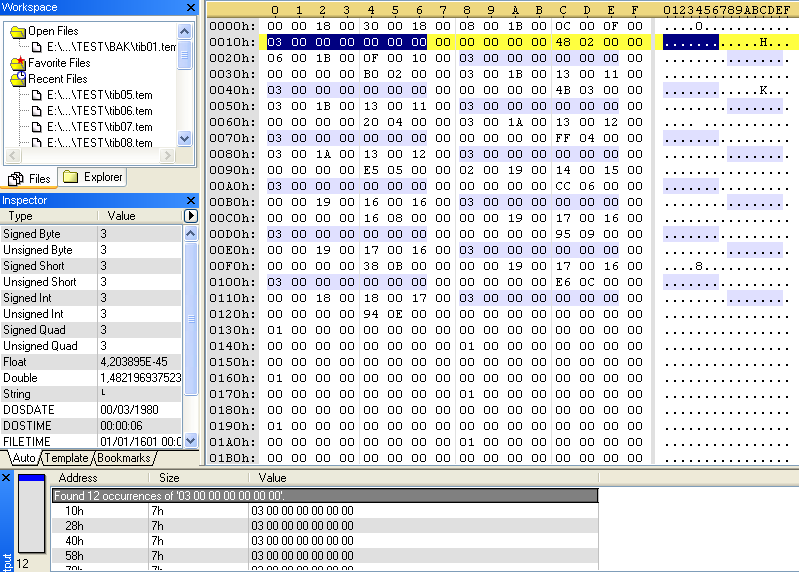
Open the SHP of the tiberium (tib##.tem or tib##.sno, ## being a number from 01 to 20) in a hex editor and search for "03 00 00 00 00 00 00" (it should work either with or without spaces).
If you didn't get any results, try looking for "03 00 00 00 00 00 07" instead and if you still don't get any results, just leave the last number away, because it might vary sometimes (do not forget it's part of the number you'll need to replace however).
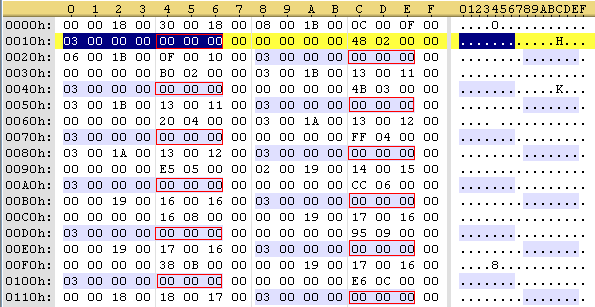
You should've gotten 12 results, like on the screenshot. The last 6 0's (3 groups of 2 0's) are a hex RGB code which tells the game which color it should display on the radar; the first result is for the first frame, the second result is for the second frame and so on.
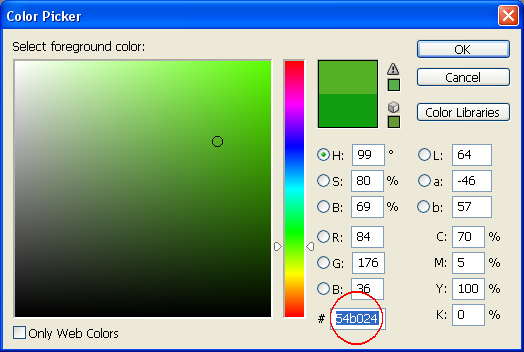
Now change those last 6 0's of each result into the RGB hex code of the color you want. You can find the RGB hex code in the color picker of most image editing programs (paint doesn't have one though), I used Photoshop.
Now save it and repeat this for every SHP of the tiberium.
For my first test, I used the same color you selected there, namely "54B024". (this was a pure coincidence though, since I took it from C&C1 tib radar color)
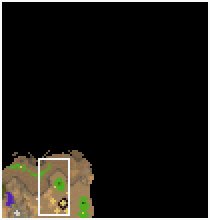
The color turned out to be good for green, but when the game transpolates it to blue tiberium, it comes out all purple.
So in the end, I opened one of the game's original tiberium SHP files and took the value "18 9F 18" from one of its last frames. It gave a much better result.
purpleblue.jpg
Description:
The purple spot you see in the lower left corner is in fact blue tiberium...
Marco: So you rigged the OFF button with a tear gas grenade? Ho ho ho, you magnificent bastard!
Sparks: Oh, that's nothin', man. The ON button is a 50-megaton hydrogen bomb.
in RA2 ore is yellow on radar, but we need it to be green, that is our problem. _________________
Sealab 2021 wrote:
Marco: So you rigged the OFF button with a tear gas grenade? Ho ho ho, you magnificent bastard!
Sparks: Oh, that's nothin', man. The ON button is a 50-megaton hydrogen bomb.
Joined: 24 May 2004 Location: Flanders (Be) Posts:300000001
Posted: Sun Oct 22, 2006 3:55 pm Post subject:
right, but if it stays yellow, I'm pretty sure it's not relative to the SHP file.
Anyway, I made a little something to help all tiberium-editing folks here:
Tiberium editing macro
For those unfamiliar with Win3.1's old Macro Recorder...
Macro Recorder is a program that can record and replay actions you perform in programs. Once a macro is recorded, you simply need to open the .rec file in Recorder and leave it open in the background. When pressing the shortcut combination associated with the macro, the actions you recorded will be replayed in the current program.
Using this principle, I've recorded 2 macros to edit the tiberium SHP files in a hex editor.
What the macro does is simple... it recreates the complete list of color values for each frame as they are in the original tib02.shp of Tiberian Sun.
It does this simply by typing the HEX values, moving 21 bytes to go to the next position, then typing in the next batch of values, moves 21 bytes on again, etc.
This will give the tiberium you made the same density-relative radar color as the original TS tiberium, with slightly different colors for each frame.
INSTRUCTIONS:
1. Start recorder.exe
2. In Recorder, open the file TIBHEX.REC
You'll see two possible macros; one is 1-step, the other is 2-step. This depends on how your HEX editor reacts on the arrow keys.
If one push on the [->] arrow moves your cursor to the next byte, use the 1-step macro (ctrl+F6). If you need to press the [->] arrow twice to move to the next byte, you need to use the 2-step macro (ctrl+F7).
3. Leave the Recorder program open and open your hex editor.
4. Open the tiberium SHP file and go to the first byte you need to change. This is the first of the 3 color values of the 1st frame.
5. press ctrl+F6 (or ctrl+F7 if you have a 2-step hex editor).
In a few seconds, The macro will type in all 12 values on their correct place.
6. Save the file.
So like this, all you need to do is open a tiberium SHP file, position your cursor on the right byte, press the shortcut combination, save, and repeat that for all tiberium files you got.
I hope you'll find this useful
TIBHEX.rar
Description:
the complete package of the Win3.11 recorder + the macro file
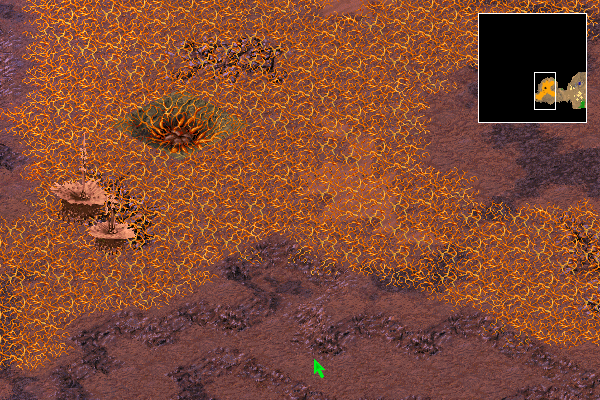
This fix can also be used to repair the Tiberium Veins radar color aswell. Just replace the first 61 instances of 00 00 07 (in my case) with color of your choice.
Thanks Bittah Commander!
Triforce
Veins Radar Fix.png
Description:
Filesize:
110.42 KB
Viewed:
33184 Time(s)
_________________ The Cake is a Lie!!!
The Cake is a Lie!!!
The Cake is a Lie!!! QUICK_EDIT
I entirily forget there ever was anything wrong with the tiberium veins
I gues I got used to over time
By the way, an easy way to get a good matching color for tiberium, tiberium veins, ice, trees or of whatever you're editing the radar color of is by pasting a part of the SHP in the TMP editor, opening the propperties window and clicking the AutoColors button. Now the TMP editor 'll give you left radar color and a right radar color (the same as high radar color and low radar color), but seeming the SHP you're editing the radar color of doesn't use this, you'll have to take the color exactly in between those colors (I don't need to tell you how to calculate it, do I? ).
Now just do what you'd normally do; enter thease RGB values in the color picker of photoshop (or any other image editing program that shows a HEX RGB code in the color picker), copy the HEX RGB value and insert into the SHP with the a hex editor. _________________ QUICK_EDIT
Joined: 24 May 2004 Location: Flanders (Be) Posts:300000001
Posted: Tue Oct 24, 2006 4:39 am Post subject:
umm, there's anything wrong with em? I just looked in TS, and they're orange on radar all right... they're only black on the multiplayer map preview when you select it. _________________ QUICK_EDIT
Oh, I thought the tiberium veins was also black on the radar ingame. Haven't played on a map with tiberium veins on it in a long while _________________ QUICK_EDIT
I'm sorry to bump old topics but I'm new here. I was wondering how and if there is a way to change the radar color of Aboreus///burgundy tiberium, so its not blue and blends in on the radar with blue tiberium. What files would i open, which tib##, thanks. QUICK_EDIT
lol, Triforce, you could've tested that first... or at least bother to look up the color of the values you've been replacing in the SHP file then
So... DID it fix the black color on the preview?
sorry for long bump, just want to clear something up.
the map select skreen minimaps are premade during map creation. _________________ Micro TS
Portable, no campaign, movies or music, just the engine and needed resources for skirmish and lan. QUICK_EDIT
Joined: 24 May 2004 Location: Flanders (Be) Posts:300000001
Posted: Fri Nov 30, 2007 4:28 pm Post subject:
sooo... that means the original TS had that colour bug for the veins at the moment the TS team was making the multiplayer maps, then?
Then again, there was never an official map editor for TS, so there's no real way to be sure about that. _________________ Last edited by Nyerguds on Sat Jun 25, 2011 10:47 pm; edited 1 time in total QUICK_EDIT
That's a very useful tool. Though a little late for me, since i didn't knew it was there and i edited my red tiberium yesterday by hand. But in future i'll use the editor,since it's much faster.
LKOtiberium.zip
Description:
red tiberium has red radar color (with code example) veins with orange radar color and removed ground between the veins
Joined: 24 May 2004 Location: Flanders (Be) Posts:300000001
Posted: Thu May 08, 2008 7:02 pm Post subject:
Well, it's been posted in the main news... if it were up to me I'd put it in the C&C Tools forum instead -_-
Maybe I should still do that? I dunno... don't really like making the same topic twice.
As for your uploads....
-doesn't red tiberium have red radar colour anyway? It adapts just like blue tib, as far as I know.
-The veins already have an orange radar colour. _________________ QUICK_EDIT
-doesn't red tiberium have red radar colour anyway? It adapts just like blue tib, as far as I know.
i made aboreus red in rules.ini but it was still blue on the radar.
Nyerguds wrote:
-The veins already have an orange radar colour.
yes, but i edited them to take the ground away and left only the veins. like here. due to this editing they became black on the radar. _________________ SHP Artist of Twisted Insurrection: Nod buildings
oh, good.
Those bytes are unkown to me(my program uses shp so I'd better know more about it). Thanks.
And the "03 00 00 00" means the shp frame is compressed. (Uncompressed if they are all 0)
Before it are the frame's width, height, distance from left-top point to the left border and the top border of the shp. Each of them uses 2 bytes.
The first 8 bytes in a shp is the file header.
the first 2 bytes seem to be 0 always, then width, height and the amount of frame after(each of them uses 2 bytes).
But there is still one unknown byte just after the radar color. QUICK_EDIT
You cannot post new topics in this forum You cannot reply to topics in this forum You cannot edit your posts in this forum You cannot delete your posts in this forum You cannot vote in polls in this forum You cannot attach files in this forum You can download files in this forum




 How to give tiberium proper radar colors

















 But in future i'll use the editor,since it's much faster.